Cutout Pro Review 2026: Pricing, Privacy Risks, and Whether It's Worth Your Data
Author
Kavya Sharma
Date Published
Reading Time
9 min read
-600x338-yZUY6wfWDwNoXjx2sWuPuGw7Tg8qGl.webp%3F2026-08-24T19%253A59%253A47.360Z&w=3840&q=82)
Search "Cutout Pro" and you don't get one product. You get a website, an Android app, and iPhone apps, made by different companies, charging different prices. Some people are paying a weekly subscription to a developer who has nothing to do with the platform they think they signed up for.
Here's where this actually lands: Cutout Pro is a real tool that does what it says. It's also carrying a verified February 2024 data breach it never told users about, and a Trustpilot page that's mostly people asking for their money back. Whether that combination is fine or a deal breaker depends entirely on what you're uploading.
What is Cutout Pro?
Cutout Pro is a credit-based AI photo and video editor that Winroad Holdings has run since 2018. It covers background removal, object erasing, face cutouts, passport photos, photo enhancement, AI image editing, and video generation. It runs in a browser, as an Android app, and through an API.
The part that trips people up isn't the feature list. It's figuring out which "Cutout Pro" they're actually looking at.
Which "Cutout Pro" are you actually using?
This is the part almost no ranking page gets right, and it matters before you spend a cent.
There are three separate products sharing the name, and they don't share ratings, prices, or even a developer:
Product | Publisher | Where | Rating | Price |
cutout.pro (web platform) | Winroad Holdings / LibAI | Browser, API, desktop | Not app-rated | Credit-based, 5 free |
Cutout Pro (Android app) | PicUP.Ai / Winroad Holdings | Google Play | 2.8 stars, | Free install, credit-gated |
Cutout Pro (App Store passport app) | Ion Danilov | Apple App Store, iOS 17+ | 4.7 stars, | Weekly / annual subscription |
The 4.7-star App Store listing that looks like the safe, well-reviewed choice is a passport and document photo app published by a completely different developer. It is not cutout.pro's app. Its data-privacy declarations are its own.
Meanwhile the official Android app from Winroad sits at 2.8 stars. So the version most people trust on rating alone is the one that isn't the platform, and the platform's own app is the one users are unhappy with. If you're on iOS and you want the actual cutout.pro toolset, the Ion Danilov app is not it.
Now that you know who you're paying, does the tool itself hold up?
What Cutout Pro actually does
Credit where it's due: the core editing engine works, and the feature list is deeper than the price suggests. Here's what you're actually getting:
- Background and object removal. The flagship. Fast enough to clear bulk product photography without babysitting each image.
- Face cutout. Isolates a subject from the background cleanly, ready to drop onto a new one.
- Photo enhancer and upscaler. Sharpens and enlarges low-resolution shots so small or old images hold up at print size.
- Old-photo colorizer. Adds color to black-and-white photos in a single pass.
- Video background removal. Strips backgrounds from footage and exports up to 4K. If you need to generate new video rather than edit existing footage, Pika and Synthesia are built for that instead.
- AI image editing. Converts and transforms photos using current generation models, similar to what Midjourney does on the generation side.
- API and Shopify plugin. For wiring background removal into a store workflow instead of uploading one file at a time.
The homepage claims it's trusted by more than 25,000 businesses. For a solo seller clearing a backlog of listing photos, the speed is genuinely useful.
I tested two features: here's what happened
To see how the tools hold up in practice, I ran two tests using the same photo.
-300x200-OT73W9lxNEUCP3tctVEJVeZUgjMmXx-300x200-LJBC1JcgpS8rI6wGS5WkLo5vXSPLIQ.webp?2026-08-24T19%3A45%3A54.503Z)
AI image editing: I uploaded a standard portrait and prompted it to convert the image into an animated style. One pass, no adjustments. The result came back as a clean anime-style illustration with the pose, hat, glasses, and background buildings all recognizably preserved. Stylistically consistent across the whole image. For a creative transformation, that's a solid output.
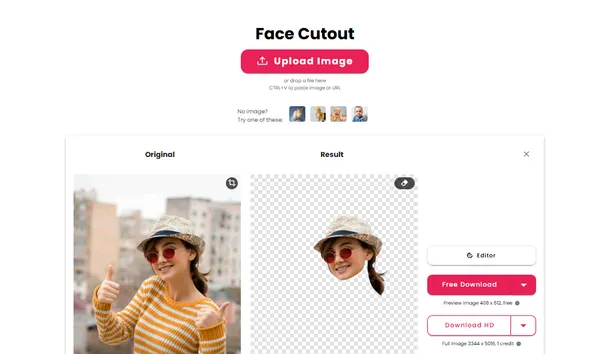
Face cutout: I ran the same photo through the face cutout tool. The result isolated the face and upper body cleanly against a transparent background, ready for compositing. It cropped tighter than I expected, cutting off some of the lower frame, but the edge detection around the hat and hair was accurate.
Both tools did what they claimed. One caveat on both: each test costs credits, and the free tier ran out fast, which is exactly the complaint you'll see throughout the reviews.
How much does Cutout Pro cost?
As of August 2026, you start with 5 free credits. After that, credits are spent per tool:
- 1 credit: background removal, image retouch
- 2 credits: passport photo, enhancer, colorizer, cartoon selfie
Those 5 free credits stretch to five background removals, or two passport photos, then you're done. That's the source of the common "free tier empties on the first upload" complaint.
Plan | Starts at | Top standard tier |
Subscription (monthly) | 80 credits / $5 | 1,450 credits / $69 |
Pay-as-you-go | 30 credits / $4.99 | 30,000 credits / $1,399 |
Two things in its favor: subscription credits roll over up to 5×, and pay-as-you-go credits never expire. One warning: the 14-day refund guarantee is capped at 50 downloads, so heavy testers can spend past it fast.
The 2024 data breach
Here's the section most pages ranking for this brand skip entirely.
In February 2024, Cutout Pro was breached. When I checked Have I Been Pwned, the record was right there: around 20 million accounts exposed, including emails, IP addresses, names, and salted MD5 password hashes. A threat actor going by KryptonZambie posted a 5.93 GB database on BreachForums, per Bitdefender. Some trackers put the count closer to 40 million. Treat 20 million as the confirmed floor.
Two things make it worse than a routine leak:
- The company denied it. Cutout Pro called the breach fraudulent, even though independent analysis judged the data real.
- Users were never notified. More than two years on, there is still no breach notice for affected accounts.
What this means for passport photos specifically: the platform does have a Passport Photo Maker. You upload a photo, pick a country size (US 2x2 inches, 3x4 cm, etc.), and export for 2 credits. The feature works on paper. But a Trustpilot reviewer described a result that came back blurry and visibly AI-altered, nearly costing them a booked passport appointment. Add the unacknowledged breach to that quality risk and uploading a government ID photo here is the scenario I'd avoid. For passport use, a dedicated service or official government photo option is the safer call.
If you had an account before early 2024, treat that login as compromised and change the password anywhere you reused it.
What real users say
I read through a stretch of recent Trustpilot and Google Play reviews, and the complaints cluster tighter than the star ratings alone suggest.
- Trustpilot (around 1.6 stars): the recurring theme is refunds. One reviewer paid the $5 plan, watched the tool burn their credits on an error, then never received the 14-day refund they were promised.
- Google Play (2.8 stars): harsher, with the top complaint calling it a "fraud app" because free credits reportedly run out on the first upload and push you to upgrade.
- Aggregator reports: tied directly to the breach, with users reporting dark-web emails, Google security alerts, and spam afterward.
One more thing worth seeing plainly: the trust scores conflict. Scamadviser rates cutout.pro "legit and safe." Scam Detector rates it "Medium Risk." Both can be true at once. Legit means the company is real, not that it's risk-free. Trustpilot's 1.6 is the number that reflects lived experience.
Who should use Cutout Pro, and who should skip it
The breach doesn't make Cutout Pro unusable. It makes it a tool you match to the file. The test is simple: how much would it hurt if this exact image surfaced somewhere it shouldn't?
Safe to run through it | Keep off it |
E-commerce product shots | Passport and ID photos |
Objects, packaging, mockups | Face photos for official use |
Non-sensitive marketing images | Client or customer data |
Images you could reshoot for free | Anything under a compliance rule |
At $5 for 80 credits, it's a cheap way to clear a backlog of listing images. The moment a real person's identity is in the frame, that missing breach notification stops being trivia and becomes your problem.
Safer alternatives for background removal
If trust is the issue, these alternatives handle background removal without the open breach question. For a broader look at the AI image and video space, browse the AI Image & Video company overviews on FirmBees.
Tool | Best for | Starting price |
remove.bg | Fast single-image removal, clean API | Free (limited), from $9/mo |
PhotoRoom | E-commerce and product photography | Free tier available |
PicWish | Bulk removal at low cost | Free tier, pay-as-you-go |
Pixian.ai | High-accuracy removal, transparent pricing | Free trial available |
One install note: if you do use the Cutout Pro Android app, install it only from the official Google Play listing. Avoid third-party "cutout pro apk" mirrors entirely.
If you've already used Cutout Pro, do this
- Change your Cutout Pro password immediately, and anywhere you reused it.
- Use a unique password per site, ideally through a password manager.
- Turn on two-factor authentication on your email and linked accounts.
- Watch for phishing emails and spam tied to your exposed address.
- If a refund was promised and never arrived, dispute it directly with your card provider.
Cutout Pro is legit in the narrow sense: a real company, working tools, a live platform. It's also risky in the way that counts, with a confirmed breach it never disclosed and a review record built on unpaid refunds. If you need reliable background removal without the baggage, one of the alternatives above will do the job with less to worry about.
Frequently Asked Questions
Is Cutout Pro safe to use?▾
Is Cutout Pro free?▾
Is Cutout Pro legit or a scam?▾
Is the App Store "Cutout Pro" the same as cutout.pro?▾
What happened in the Cutout Pro data breach?▾
How do I get a refund or cancel Cutout Pro?▾
What are the best Cutout Pro alternatives?▾
Written by
Kavya Sharma
Kavya Sharma is a senior content writer and prompt specialist at FirmBees, focused on AI tools, workflow automation, and practical prompt engineering. She holds Commerce degrees from Delhi University and IGNOU, along with a data analytics certification covering Excel, Power BI, and SQL. That analytical training is visible in her work: every prompt she publishes is tested across multiple AI models, and her guides include specific inputs, expected outputs, and measurable comparisons.