How to turn on dark mode on X (Twitter) in 2026
Author
Kavya Sharma
Date Published
Reading Time
3 min read

X removed its Dim theme in February 2026 and restructured its mobile display controls in March 2026. If your app suddenly looked white or your old settings stopped working, this is why. Here is the exact fix for every platform.
Platform | Where to change it | Options available |
iPhone / Android | Inside X app > Display settings | System, Day, Night |
Desktop (PC/Mac) | X web > More > Settings > Display | Default (light), Lights Out (dark) |
Cost | Free for all users |
How to turn on dark mode on X on desktop (PC and Mac)
Dark mode on the X website is controlled directly inside X's settings. No need to change your OS or browser settings.

- Open X.com in your browser and log in. In the left sidebar, click More.
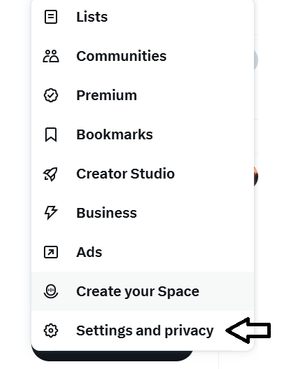
- From the menu that appears, select Settings and privacy.
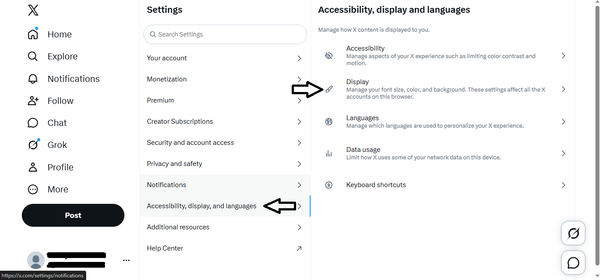
- In the left settings panel, click Accessibility, display, and languages.
- Click Display from the right side panel.
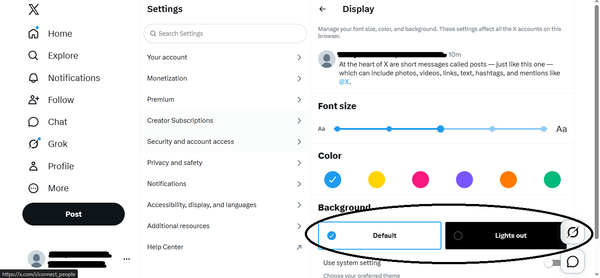
- Under Background, select Lights out. X switches to dark mode instantly.
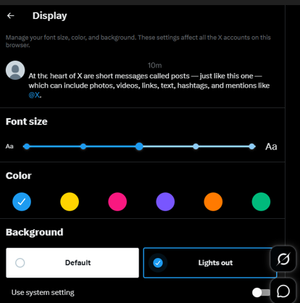
Note on Dim mode: X removed the Dim theme from its web version in February 2026. The only dark option now available on desktop is Lights Out (pure black).
How to turn on dark mode on X on iPhone and Android
On mobile, X has a built-in Display toggle inside the app. You can set X to Night mode independently without changing your phone's system appearance.
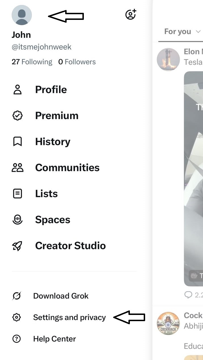
- Open the X app on your phone. Tap your profile picture (top-left) to open the side menu.
- Scroll down and tap Settings and privacy.
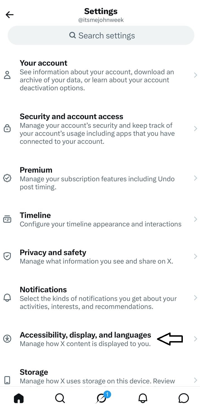
- Tap Accessibility, display, and languages.
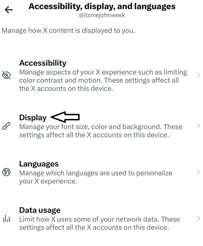
- Tap Display.
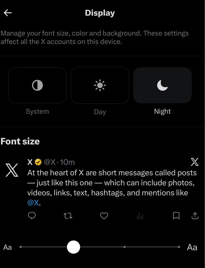
- Select Night from the three options: System, Day, or Night. X turns dark immediately.
What each display option means
- System: X follows your phone's light/dark setting automatically.
- Day: X always stays in light mode regardless of your phone setting.
- Night: X always stays in dark mode regardless of your phone setting.
What changed with dark mode on X in 2026?
X removed the Dim theme from its desktop version in February 2026 and restructured its mobile display controls in March 2026.
- February 2026: The Dim theme, a soft bluish-gray background that had been available since 2016, was removed from the web version. Desktop now shows only two choices: Default and Lights Out.
- March 2026: The mobile app stopped letting users pick dark mode independently inside X. It switched to following your phone's system setting by default. The in-app Day, Night, and System toggle was later restored, which is why you can still find it in Display settings today.
Frequently Asked Questions
Why does X keep switching back to light mode?▾
What happened to Dim mode on X?▾
Does X Premium give extra dark mode options?▾
Can I use X in dark mode without putting my whole phone in dark mode?▾
The Display settings on X desktop are not working. What's wrong?▾
Written by
Kavya Sharma
Kavya Sharma is a senior content writer and prompt specialist at FirmBees, focused on AI tools, workflow automation, and practical prompt engineering. She holds Commerce degrees from Delhi University and IGNOU, along with a data analytics certification covering Excel, Power BI, and SQL. That analytical training is visible in her work: every prompt she publishes is tested across multiple AI models, and her guides include specific inputs, expected outputs, and measurable comparisons.