Is Sejda PDF Editor Worth It in 2026?
Author
Kavya Sharma
Date Published
Reading Time
9 min read

You've probably landed on Sejda's homepage after searching for a free way to edit a PDF, and the page looks almost too simple. That usually makes people pause. Is this actually free, or is there a catch waiting a few clicks in?
Short answer: Sejda's free plan is real, but it's capped. You get 3 tasks per hour and file limits that change depending on which tool you're using. Paid plans start at $5 for a one-time 7-day pass and go up to $63 a year for desktop plus web access.
So what does that actually mean for you before you upload anything? Let's break it down.
What is Sejda PDF editor?
Sejda is a PDF editing tool. It lets you edit text and images, merge and split files, convert PDFs to Word or JPG, add e-signatures, and run OCR on scanned documents, all from a browser or through a separate desktop app.
It runs on a freemium model: a limited free tier for occasional tasks, and paid plans for people who need to work without caps.
Web version vs desktop version
Sejda comes in two forms, and mixing them up is where a lot of the confusion about "is it free" comes from.
- Sejda Web: Runs entirely in your browser. You upload a file, Sejda processes it on its own servers, and the file is automatically deleted after 2 hours. No installation needed, works the same on Windows, Mac, or Chromebook.
- Sejda Desktop: Installs locally on your computer. Files never leave your machine, which matters if you're editing something you'd rather not upload anywhere, a signed contract, a medical form, tax paperwork.
Here's the thing nobody tells you upfront: Sejda Desktop has no free tier at all.
One reviewer on the Google Workspace Marketplace, who had used the free web version for years, was genuinely surprised to find out the desktop app is subscription-only. If you want offline, local processing, you're paying for it.
Both versions cover the same core toolset: edit, merge, split, convert, sign, and OCR. The difference is where your file physically goes while it's being worked on.
"Okay, but what's this actually going to cost me if I go past the free tier?" That's the next question, so let's get into it.
Is Sejda PDF editor free? The real limits explained
Yes, Sejda's free tier is genuinely usable, not a stripped-down demo. You can edit, merge, split, and convert PDFs with no signup required.
I ran a test file through the free web editor to confirm this myself. The upload screen stated it plainly: files stay private, they're automatically deleted after 2 hours, and the free service covers documents up to 200 pages or 50MB, capped at 3 tasks per hour.
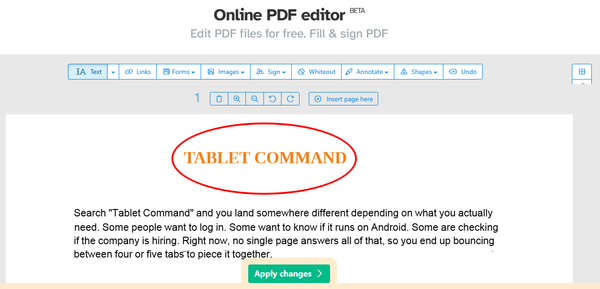
Inside the editor, I used the Shapes tool to draw a circle around a heading and drop a label inside it, then hit Apply changes. Upload to finished, downloadable PDF took under a minute, with no signup at any point.
But those limits aren't uniform across every tool. A few caps to know before you start:
- Task limit: 3 tasks per hour on the free plan, across most tools
- File size on the general editor: up to 200 pages or 50MB per file
- File size on PDF to JPG specifically: capped lower, at 20 pages or 50MB
- OCR on the free tier: limited to 10 pages, versus up to 100 pages on a paid plan
- Auto-deletion: uploaded files are wiped from Sejda's servers 2 hours after processing
If you're converting a 40-page scanned document to JPG, you'll hit that lower cap well before you would on a basic text edit.
Some older third-party posts describe the free-tier cap as "3 tasks per day." That's outdated, the live figure, confirmed on Sejda's own upload screen, is 3 tasks per hour.
A Google Workspace reviewer also pointed out that the page-view cap isn't clearly spelled out in the product description, so people find out mid-task. Worth knowing going in rather than discovering it the hard way.
How much does Sejda cost?
Here's the pricing breakdown, verified directly from Sejda's own upgrade page as of August 2026:
Plan | Price | What you get |
Free | $0 | 3 tasks/hour, page and size limits vary by tool, files auto-delete after 2 hours |
Web Week Pass | $5 one-time | 7 days of unlimited web access, no hourly caps |
Web Monthly | $7.50/month | Ongoing web access, no hourly caps |
Desktop + Web Annual | $63/year | Full desktop app plus web access for a full year |
The Week Pass is worth calling out on its own. It's a one-time $5 charge, not a subscription, so there's no auto-renewal to remember to cancel.
If you've got a short burst of PDF work, a semester of assignments, one big contract batch, that's a cheaper way to remove the caps than committing to a monthly plan.
"Is this worth switching from what I'm already using?" Depends on your team size, and Sejda has a discount ladder most people never scroll down far enough to see.
Does Sejda offer team pricing?
Yes. Volume discounts apply to all three paid plans, based on how many people are using them:
- 2 to 4 users: 10% off
- 5 to 24 users: 20% off
- 25 to 49 users: 40% off
- 50+ users: 60% off
Neither of the competing pages I checked while researching this mentions team pricing at all, even though it's sitting right there on Sejda's own upgrade page.
If you're rolling this out for a small office instead of yourself, that discount changes the math significantly, especially at the 5 to 24 user tier where you're already getting a fifth off.
Is Sejda PDF editor safe to use?
This comes down to which version you use.
Sejda Web uploads your file to its servers, processes it, and deletes it automatically after 2 hours. Sejda Desktop never uploads anything, it processes your file locally on your own machine.
For a quick edit to a non-sensitive document, the web version's 2-hour auto-deletion is a reasonable middle ground.
For anything you'd rather not send anywhere, signed agreements, financial statements, anything with client information, the desktop app is the safer call, even though it means paying for the subscription rather than using the free web tier.
What real Sejda users actually say
Most "best PDF editor" roundups either quote one review platform or lean entirely on a competitor's own comparison page. Neither gives you the full picture, so here's what's actually showing up across Trustpilot, Capterra, and the Google Workspace Marketplace.
What people like:
- Trustpilot reviewers repeatedly call out how fair the free tier feels compared to other PDF tools
- Several specifically said they assume Sejda earns from premium upgrades rather than ads, and read that as a trust signal
- On Capterra, Sejda holds a 4.7 out of 5 overall rating, with ease of use rated highly and customer service landing lower at 4.2
- A number of long-term Capterra reviewers, some with a year or more of use, switched from Adobe Acrobat because it felt overbuilt for basic tasks like signing a form or merging two files
What people don't like:
- The most repeated complaint, showing up across Trustpilot, and TechRadar's review, is that text editing works line by line rather than treating a paragraph as one flowing block
- On more complex documents, that can shift the page layout in ways you don't notice until after you've saved
- A smaller number of reviewers mentioned slow support responses when trying to sort out billing or subscription issues
Sounds fine for basic edits, right? Here's where it gets more complicated for anyone with heavier document needs.
Who Sejda is really for (and who should look elsewhere)
Sejda works well if you're a student, freelancer, or small-business employee who needs to edit, sign, or convert PDFs a few times a week, not a few hundred times a day.
The Capterra data backs this up directly: long-term users who switched away from Adobe Acrobat did so because Acrobat was more than they needed for straightforward tasks.
It's a weaker fit if you're processing PDFs constantly, need advanced layout design control, or want deep integration with tools like Microsoft 365 or Google Workspace beyond basic file upload.
Reviewers evaluating Sejda against enterprise-grade PDF suites have pointed out gaps in real-time collaboration and bulk automation. A small business doing occasional edits will likely never miss those, but a document-heavy operations team probably will.
How to do the most common Sejda tasks
A few of the most-searched Sejda tasks, in short:
- PDF to Word: Available on the free tier, and it follows the same task and page limits as everything else.
- PDF to JPG: Also free, but remember the lower cap here, 20 pages or 50MB, not the 200-page allowance the general editor gets.
- Adding a watermark: Available through the standard PDF editor tool, works the same on free and paid tiers, just subject to the same per-hour task cap on the free plan.
Is Sejda PDF editor worth it?
For occasional use, yes. The free tier holds up to what it promises, and the $63-a-year plan removes every cap if you outgrow it.
The catch isn't hidden pricing. It's simply knowing the limits vary by tool before you start, and that the desktop app is paid-only from day one.
If you're editing a PDF once or twice this month, stick with the free web version and watch the hourly cap. If you're doing this weekly, or need offline, local processing for sensitive files, the $63 annual plan or the $5 Week Pass for short bursts will save you more time than it costs.
Frequently Asked Questions
Is Sejda PDF editor free?▾
How much does Sejda cost without the free-tier limits?▾
Does Sejda offer team or volume pricing?▾
Is Sejda PDF editor safe to use?▾
How do I cancel a Sejda subscription?▾
What's the biggest complaint real Sejda users have?▾
Is Sejda a good Adobe Acrobat alternative?▾
Written by
Kavya Sharma
Kavya Sharma is a senior content writer and prompt specialist at FirmBees, focused on AI tools, workflow automation, and practical prompt engineering. She holds Commerce degrees from Delhi University and IGNOU, along with a data analytics certification covering Excel, Power BI, and SQL. That analytical training is visible in her work: every prompt she publishes is tested across multiple AI models, and her guides include specific inputs, expected outputs, and measurable comparisons.