Viyou AI Review 2026: Features, Pricing, and Is It Worth It
Author
Kavya Sharma
Date Published
Reading Time
9 min read

You've probably seen a Viyou AI ad mid-scroll. A kiss clip or a dance video that looks a little too smooth to be real, with a caption promising you can make the same thing from one photo.
Here's the direct answer. Viyou AI is a text-to-video and image-to-video app that turns a prompt or a single photo into a short clip. It's real, but its pricing is more layered than the ad makes it sound.
Web plans start at $7.99 a week. The iOS app runs on a separate purchase structure with its own pricing. There's also a separate coin system on top of both.
Wondering which number actually applies to you? That's exactly what the ads skip over.
What is Viyou AI?
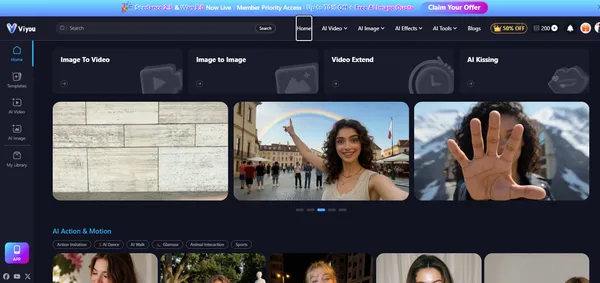
Viyou AI is an AI video and image generation platform built by FUTUREVISION AI LIMITED. It converts text prompts or uploaded photos into short animated clips, template-based effects like AI kiss and AI dance videos, and stylized still images.
It's aimed mainly at people making content for TikTok, Instagram, and product listings, not professional filmmakers.
Key features
Viyou doesn't run one in-house model. It aggregates several third-party video and image engines under one subscription, organized into four menus: AI Video, AI Image, AI Effects, and AI Tools.
AI video generation
The core function is text-to-video and image-to-video. Type a prompt, or upload a photo, and the app animates it into a short clip.
The model lineup is genuinely broad. It includes Viyou's own 4.0 and 3.0 models plus licensed access to Seedance 2.5, Seedance 2.0, Wan 3.0, Wan 2.7, Kling 3.0, Google Veo 3.1, Sora 2, Vidu Q3, Minimax H3, and older names like Pika and Hailuo 02.
There's also motion control, which lets you nudge how the subject moves instead of leaving it fully automated, plus a video extender and a basic video editor tucked under the AI Tools menu.
AI image generation
Alongside video, Viyou handles text-to-image and image-to-image generation. This is useful if you want a stylized product shot or a portrait variation before you touch the video tools.
Image models on offer include Viyou 4.0, Viyou 3.0, GPT Image 2, Flux2 Klein, Grok-2-Image, Nano Banana, and Seedream 4.5.
Template effects
This is where most of the marketing lives. Under AI Effects you'll find a Kissing Hub, an AI Girlfriend and AI Boyfriend generator, and rotating seasonal templates. Under AI Tools sits a custom AI kiss generator, an AI dance generator, an AI outfit generator, and an AI background remover.
On Google Play, one reviewer left a largely positive rating but asked that outputs like the "Whisper of a Kiss" template stick closer to the exact preview, regardless of the photo's background. It's a small but real reminder that template results don't always match the demo one-to-one.
So the feature list looks solid on paper. But what does it actually cost to use any of this past the free tier?
How much does Viyou AI cost?
Here's the thing nobody selling you on this app tells you upfront. Viyou runs three separate pricing systems, and the ad you saw was probably only showing you one of them.
1. Web membership plans (billed weekly or annually, coins included):
Plan | Weekly billing | Annual billing (per week / lump sum) | Coins included | Models unlocked |
Starter | Free | Free | 200 coins, lifetime | — |
Lite (Hobbyist) | $7.99/week | $0.77/week → $39.99/year | 600/week or 4,000/year | 20+ |
Pro (Creator) | $9.99/week | $1.35/week → $69.99/year | 1,200/week or 8,000/year | 40+ |
Max (Power User) | $27.99/week | $5.77/week → $299.99/year | 2,800/week or 35,000/year | 60+ |
These figures were confirmed directly from the live pricing page under an active "Create Without Limits, 50% OFF" promotion, which is why the annual rate looks sharply discounted against the weekly one.
2. One-time coin top-ups, if you'd rather not commit to a membership:
- 1,000 coins: $12.99
- 1,500 coins (+300 bonus): $17.99
- 3,500 coins (+500 bonus): $34.99
- 6,000 coins (+3,000 bonus): $69.99
- 10,000 coins (+5,000 bonus): $99.99
- 25,000 coins (+10,000 bonus): $199.99
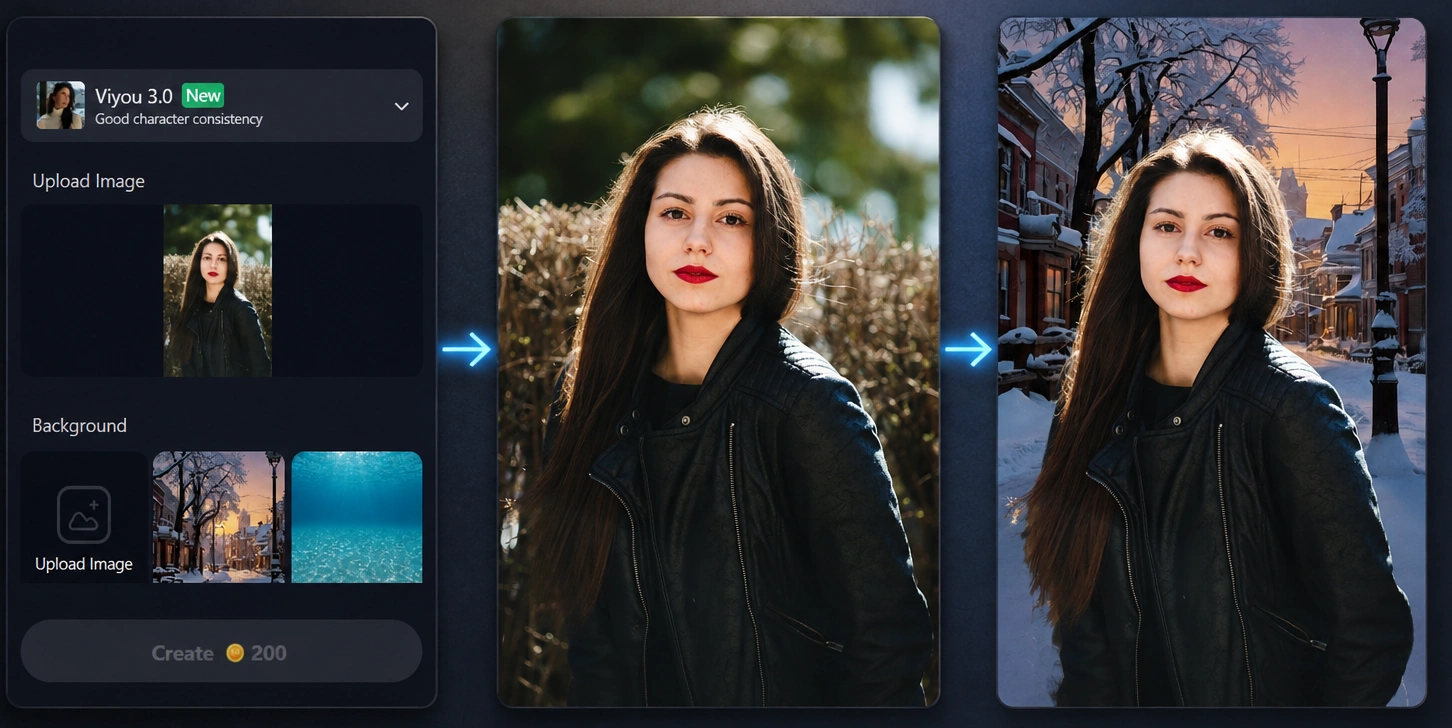
Hands-on test: I tested the AI Background Remover myself, swapping the background on a plain outdoor portrait for a snowy street scene. It took a little over a minute to generate, and it used all 200 of the free Starter coins in that one generation. That's the entire trial balance spent on a single background swap, with nothing left to test video generation, which starts at 3,600 coins for one Viyou 4.0 image-to-video clip, roughly 18 times the whole free allowance.
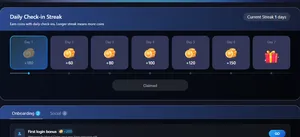
There's a way to stretch that free balance further, though. Viyou runs a daily check-in reward worth 180 coins on day one, rising to 150 coins by day six and a bonus gift on day seven, plus a separate 200-coin first login bonus and additional tasks under its onboarding and social tabs. Check in consistently for a week and you can realistically stack several hundred extra coins on top of the starter balance, enough for a few more image edits, even if it still falls well short of covering a single video generation.
3. The iOS app subscription, which uses a different purchase structure than the website. Apple's own in-app purchase disclosure lists it as: Viyou Pro at $9.99, $29.99, $49.99, and $199.00, plus separate Coins Packages at $12.99, $19.99, $39.99, $69.99, $99.99, and $199.99.
Apple doesn't label which price covers which billing period, but the $9.99 tier lines up exactly with the web's Pro plan at $9.99/week, so that's almost certainly the weekly option, with the higher tiers likely covering monthly and annual billing.
The coin packages run a little higher than the web equivalents ($19.99 versus the web's $17.99, for example), which is typical of Apple's in-app purchase markup rather than a genuinely separate coin system.
As of September 2026, that's the most reliable public breakdown of the iOS pricing available. If you want the exact monthly and annual figures confirmed, the purchase screen inside the app itself will show it plainly.
Okay, but does paying more actually get you a platform you can trust?
Is Viyou AI legit? (Pros and cons)
Viyou is a real, operating company, not a scam storefront that vanishes after payment. But "legit" and "friction-free" aren't the same thing, and the review pattern here matters more than the marketing copy.
Pros:
- Free Starter tier lets you generate at least one real output before paying anything, and daily check-ins add more coins on top
- Wide feature spread: video, image, and template effects under one login, backed by a broad model lineup
- Clear tier structure once you know to check web pricing separately from the app
Cons:
- The 200 free coins don't stretch far on their own. My background-swap test used the entire balance in one generation, and video generation alone costs 18 times that amount
- A Trustpilot reviewer directly disputes the platform's "unrestricted" generation claims, describing content rejections for mild material despite the uncensored branding used in ads
- Another Trustpilot review describes paying for a full year, having the app stop working, and having to pursue a refund
- Support responsiveness is a recurring complaint in the reviews I read through
Look, the marketing pages won't say this, but the "uncensored" claim is one of the most disputed parts of Viyou's branding. If that's the specific feature drawing you in, treat it as unconfirmed rather than guaranteed.
Given that support pattern, the more useful question might not be whether to subscribe. It's whether you know how to get out if it doesn't work for you.
How to cancel Viyou AI
Cancellation reports are mixed. Some reviewers say the in-app cancel button works in a few seconds, while others describe it failing to stop billing entirely. If support goes quiet, the safer backup is disabling auto-payments directly through your payment provider.
- If you subscribed through the web with PayPal, go into your PayPal account settings and cancel the automatic payment to Viyou or FUTUREVISION AI LIMITED directly, rather than relying solely on an in-app cancel button
- If you subscribed through the iOS app, cancel through your Apple ID subscription settings, since App Store billing runs independently of the web account
- Screenshot your cancellation confirmation either way, given the support responsiveness complaints noted above
That's a genuinely useful step most competing pages skip entirely. It's the difference between an app store login you might not remember and a checkable action inside a tool you already use.
Viyou AI alternatives
If the pricing structure or the "uncensored" dispute is giving you pause, it's worth comparing Viyou against other multi-tool AI image and video generators before you commit to a plan.
Viyou AI | Hotpot AI | |
Core focus | AI video and image generation | AI image editing only, no video tools |
Free tier | 200 lifetime coins, plus daily check-in and login bonuses | 75 images/day, watermarked, personal use only |
Cheapest paid entry | $7.99/week (Lite), or $39.99/year on the annual plan | $12 one-time for 1,000 credits |
Commercial use | Included once you're on a paid tier | Free-tier images are watermarked and not licensed for commercial use |
Best for | Video-first content: kiss/dance templates, image-to-video clips | Budget image edits: background removal, upscaling, restoration |
Quick way to decide between them:
- Pick Viyou AI if video is the whole point, none of Hotpot's tools touch video at all
- Pick Hotpot AI if you only need image edits and want to avoid a weekly subscription
- Pick neither yet if you just want to browse more options first, our AI Image & Video category hub rounds up the rest of the field
So where does that leave you? If you're testing the waters, start on the free Starter tier, check in daily for a few extra coins, and see whether the outputs match what the ads showed you.
Then decide whether the $7.99/week Lite plan is worth it for your actual output volume, and cancel through PayPal or the App Store directly if it isn't. That one habit, canceling through the payment source instead of just the app, will save you the exact headache several reviewers describe.
Frequently Asked Questions
What is Viyou AI?▾
Is Viyou AI free?▾
How much does Viyou AI cost vs. the iOS app?▾
Is Viyou AI safe or legit?▾
Can you cancel Viyou AI anytime?▾
What can you make with Viyou AI?▾
Written by
Kavya Sharma
Kavya Sharma is a senior content writer and prompt specialist at FirmBees, focused on AI tools, workflow automation, and practical prompt engineering. She holds Commerce degrees from Delhi University and IGNOU, along with a data analytics certification covering Excel, Power BI, and SQL. That analytical training is visible in her work: every prompt she publishes is tested across multiple AI models, and her guides include specific inputs, expected outputs, and measurable comparisons.
Comments
Leave a comment
Related posts

Midjourney overview: products, pricing, and alternatives
Midjourney is an independent, bootstrapped AI research lab known for its text-to-image and video platform, used by millions despite no free tier and active Disney, Universal, and Warner Bros. Discovery copyright lawsuits.

Synthesia overview: products, pricing, and alternatives
Synthesia builds an AI video platform that turns scripts into avatar led videos in 140+ languages, used by over 90% of the Fortune 100 for training and internal comms, backed by $200M in Series E funding at a $4B valuation from Google Ventures.