How to Change Your ChatGPT Password (Every Scenario, 2026)
Author
Kavya Sharma
Date Published
Reading Time
8 min read

Most guides assume you already know how you signed up for ChatGPT. That one detail changes everything. If you used Google to create your account, there is no ChatGPT password screen at all, you'll never see a reset option. If you signed up with email, your path depends on whether you're still logged in or locked out.
To change your ChatGPT password while logged in: go to Settings > Security and login > Password > Add. You'll get a verification code by email before you can set the new password. If you're locked out, use the Forgot Password flow from the login page. If you signed up with Google, Apple, or Microsoft, skip straight to that section, the reset flow won't work for you.
Pick your situation and jump to the right part.
Which method applies to you?
Your situation | Go to |
Logged in, signed up with email and password | Method 1 |
Locked out, signed up with email and password | Method 2 |
Entering your email redirects you to a Google/Apple/Microsoft sign-in screen | Method 3 |
Want to remove passwords entirely | Advanced Account Security |
On iPhone | iPhone section |
Method 1: Change your password while logged in
Verified against the live product, not just OpenAI's published help article, which is currently out of date.
- Open chatgpt.com and make sure you're logged in.
- Click your profile icon at the top right.
- Go to Settings > Security and login.
- Find the Password field and click Add.
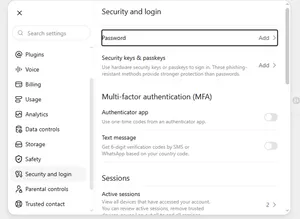
- Check your email. A 6-digit verification code arrives within a minute or two.
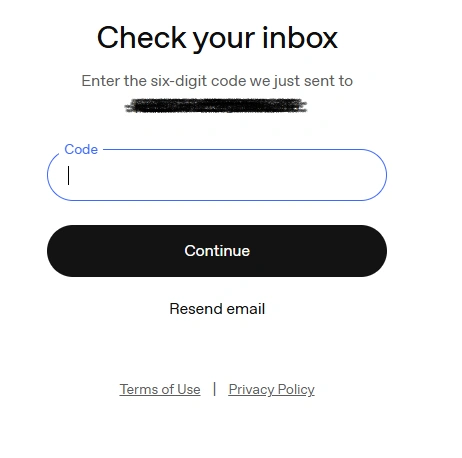
- Enter the code and click Continue.
- On the next screen, enter your new password twice and click Continue.
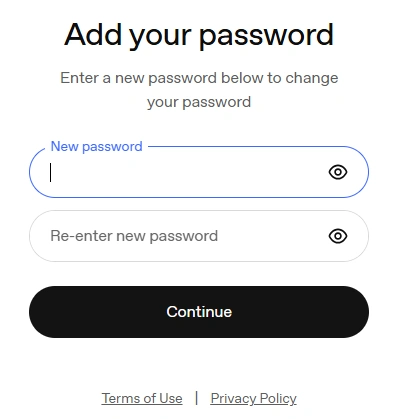
This step does need your email. It's not an instant form. If you don't see the code, check spam. The code is short-lived, so use it soon after it arrives.
Once your password is set, it updates your entire OpenAI account, including the API Platform. Sessions on other devices get logged out.
A note on the path name. OpenAI's own help center still says Settings > Account. That's outdated. The current live path is Settings > Security and login. If you're following an older guide and can't find the Account tab, this is why.
Method 2: Reset a forgotten ChatGPT password
If you're locked out, you'll go through the reset email flow. Open an incognito or private window first. It avoids cached session issues.
- Go to chatgpt.com in a private window.
- Click Log in.
- Enter the email address or phone number tied to your account.
- Click Continue.
- Select Forgot password?
- Follow the instructions in the reset email.
If you originally signed up with Google, you won't see this option at all. Entering your email and clicking Continue redirects you straight into Google's own sign-in screen, not a ChatGPT password screen. There's no "Forgot password?" link anywhere in that flow, because ChatGPT never had a password to begin with. If you land here, you're actually in Method 3, not Method 2.
The reset email usually lands within 30 seconds to a couple of minutes, for accounts that do have a ChatGPT password. If it doesn't show up, check spam and make sure you typed the right email.
Use the reset link or code soon after it arrives. Reset instructions are time-limited.
Can you reset with your phone number? Yes. On the login screen, ChatGPT accepts either your email or your phone number. Enter your phone number where it asks for an email, hit Continue, then select Forgot password?
Method 3: If you signed up with Google, Apple, or Microsoft
Here's the thing nobody tells you upfront. If you created your ChatGPT account using Google, Apple, or Microsoft, there's no ChatGPT password screen at all. When you try to sign in, ChatGPT redirects you straight into that provider's own sign-in page.
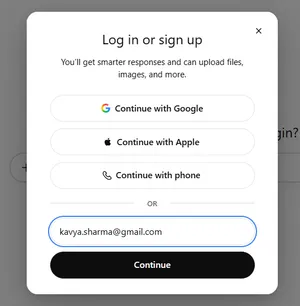
Confirmed directly: on the Google sign-in screen ChatGPT redirects you to, there's a Forgot email? link, but no ChatGPT-side "Forgot password?" option anywhere in that flow.
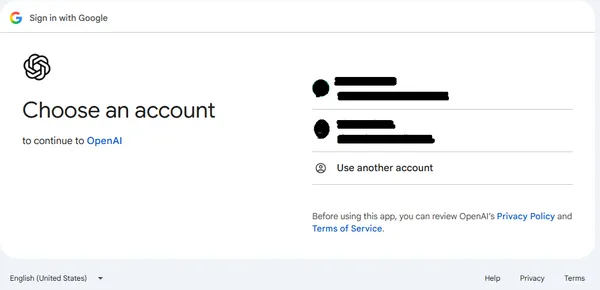
The password, or the account selection itself, belongs entirely to Google. If you don't remember it, that's a Google account recovery problem, not something ChatGPT support can fix.
What to do:
- Google accounts: go to myaccount.google.com > Security > Change password.
- Apple accounts: go to appleid.apple.com > Sign-In and Security > Change Password.
- Microsoft accounts: go to account.microsoft.com > Security > Change Password.
Once you update it at the provider level, your ChatGPT login updates automatically, since ChatGPT is just handing off to that provider's login screen every time.
The SSO lock-in problem
A lot of users who signed up via Google later want to add a separate email and password so they can log in without going through Google. As of now, you cannot do this inside ChatGPT settings. Trying to force it through the forgot-password flow produces a "provider mismatch" error, documented repeatedly on OpenAI's own community forum, with no fix as of this writing.
If you're stuck, contact OpenAI Support directly. There's no in-app workaround.
Advanced Account Security: removing passwords entirely
This is a separate, newer feature from the regular password flow, worth knowing about even if you don't plan to use it.
What it is. Advanced Account Security replaces passwords entirely. Once enrolled, you sign in only with passkeys or physical security keys. Password sign-in, SMS codes, and email-based account recovery are all disabled.
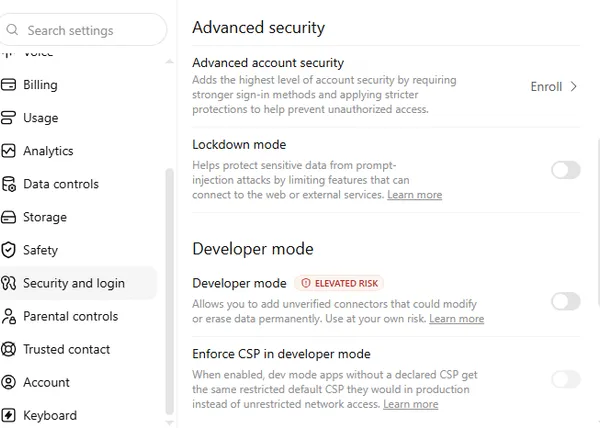
It launched in April 2026 and is built for people at higher risk of targeted attacks: journalists, researchers, elected officials, and anyone who wants stronger protection than a password and MFA can offer.
How to enroll. Go to Settings > Security and login > Advanced security, then select Enroll next to Advanced account security. You need at least two sign-in methods before you can turn it on, that can be two passkeys, two hardware security keys, or one of each, and at least one method needs to work across devices.
Here's the part worth knowing before you enroll. Once this is on, there's no fallback to a password if you lose your passkey or security key. Email and SMS recovery are disabled. The only way back in is a one-time recovery key you're given during setup. Store it somewhere safe before you enroll, not after. If you use a valid recovery key, your account unlocks 48 hours later, not immediately.
This isn't for everyone. If you'd rather keep an email fallback, standard MFA with an authenticator app is a lighter option that still gets you real protection, covered below.
How to change your ChatGPT password on iPhone
The safest way to do this on iPhone is through Safari, not the ChatGPT app. Open Safari, go to chatgpt.com, and follow whichever method applies to you above: Method 1 if you're logged in, Method 2 if you're locked out, Method 3 if your account is linked to Google, Apple, or Microsoft. The screens are the same ones already covered, just on a smaller display.
If your account is Google-linked, you'll hit the same Google redirect described in Method 3, just inside Safari instead of a desktop browser.
How do I find or see my ChatGPT password on iPhone?
ChatGPT doesn't show you your password inside the app. But if you saved it in Safari AutoFill at some point, you can find it in your iPhone's Passwords app.
- iOS 18 or later: open the dedicated Passwords app.
- iOS 16 or 17: go to Settings > Passwords.
- Authenticate with Face ID or Touch ID.
- Search for openai.com or chatgpt.com.
If you signed up via Google, no password is stored, because Google manages the login, not your iPhone keychain.
Troubleshooting: when the reset still doesn't work
"Why did my reset email arrive but my new password still won't work?" That's the most common complaint on OpenAI's forums, and the answer is almost always the SSO lock-in issue from Method 3.
Not receiving the reset email or verification code:
- Check spam and promotions folders.
- Make sure you're using the exact email tied to your account.
- Wait a couple of minutes and request a new one if nothing arrives.
Code or reset link expired:
- Request a new one. Don't reuse the old one.
"Provider mismatch" error:
- You're an SSO user trying to sign in with a password ChatGPT doesn't recognize for your account. See Method 3.
Can't find the Account tab:
- It's now called Security and login. Older guides haven't caught up.
After changing your password: 3 things to do now
- Turn on MFA. Go to Settings > Security and login > Multi-factor authentication. Two real options: an authenticator app, where you scan a QR code and enter a one-time code, or text message, where you get a code by SMS or WhatsApp. Turning on MFA doesn't log you out of your current session.
- Save the new password to a password manager. 1Password, Bitwarden, or Apple's built-in Passwords app all work.
- Log out of shared or old devices. Go to Settings > Security and login > Log out of all devices. This can take up to 30 minutes to apply everywhere.
If you want to go further than a password and MFA, Advanced Account Security replaces passwords entirely, covered above.
The quick version
The path you need depends entirely on how you originally signed up. Email account? Change it in Settings or reset via email, and expect a verification code either way. Google, Apple, or Microsoft account? There's no ChatGPT password screen to find, you're redirected straight to that provider, and that's where you change it.
Turn on MFA once you're done. It's a quick step and covers you against most account takeover attempts.
Frequently Asked Questions
Can I change my ChatGPT password while I'm logged in?▾
How do I reset a forgotten ChatGPT password?▾
I signed up with Google. How do I change my ChatGPT password?▾
Why am I not receiving the ChatGPT password reset email or code?▾
How do I find or see my ChatGPT password on iPhone?▾
Does changing my ChatGPT password affect other OpenAI services?▾
What is Advanced Account Security, and should I use it?▾
Can I reset my ChatGPT password using my phone number?▾
Written by
Kavya Sharma
Kavya Sharma is a senior content writer and prompt specialist at FirmBees, focused on AI tools, workflow automation, and practical prompt engineering. She holds Commerce degrees from Delhi University and IGNOU, along with a data analytics certification covering Excel, Power BI, and SQL. That analytical training is visible in her work: every prompt she publishes is tested across multiple AI models, and her guides include specific inputs, expected outputs, and measurable comparisons.
Comments
Leave a comment
Related posts

OpenAI overview: products, pricing, and alternatives
OpenAI is the research and deployment company behind ChatGPT, GPT-5.6, and Codex. See what it costs, whether it trains on your data, how stable the company is, and how it compares to Claude, Gemini, and Perplexity.
-500x500-Vxsm2cWdzWBfwMDeBZB9OpYwxUCyPQ.jpg%3F2026-08-17T17%253A53%253A30.796Z&w=3840&q=82)
18 fun ChatGPT prompts that actually surprise you (2026)
18 fun ChatGPT prompts for self-discovery, roasts, role-play, and image generation, with real results and honest verdicts on each one.