Picofme.io: The Complete Guide to Features, Templates, and Alternatives
Author
Ethan Walker
Date Published
Reading Time
7 min read

Psychologists have found that people form a judgment about you from a single photo in around 40 milliseconds, roughly twice the speed of an eye blink. That's the entire premise Picofme.io was built on, and it's also why so many people end up searching for it: a bad profile picture costs you something before anyone reads a word you've written.
Picofme.io is a free, web-based AI tool that strips the background out of a photo and rebuilds it into a profile picture using layered templates, filters, borders, and outlines, with no sign-up and no cost. As of September 2026, that's still true across every source checked. Most articles about it stop at that one sentence. This one covers what the editing panel actually contains, the template system almost nobody explains properly, and how it stacks up against Canva, remove.bg, and PFPMaker.
Picofme.io at a glance
Price | Free, no paid tier |
Editing tools | 8-part panel: canvas, transform, background, filters, outline, shadow, border, layers |
Templates & guides | Public template sharing, plus a library of 15+ platform and trend-specific how-tos |
Best for | One-person profile pictures, fast |
Skip if | You need more than one narrow job done (details below) |
What is Picofme.io?
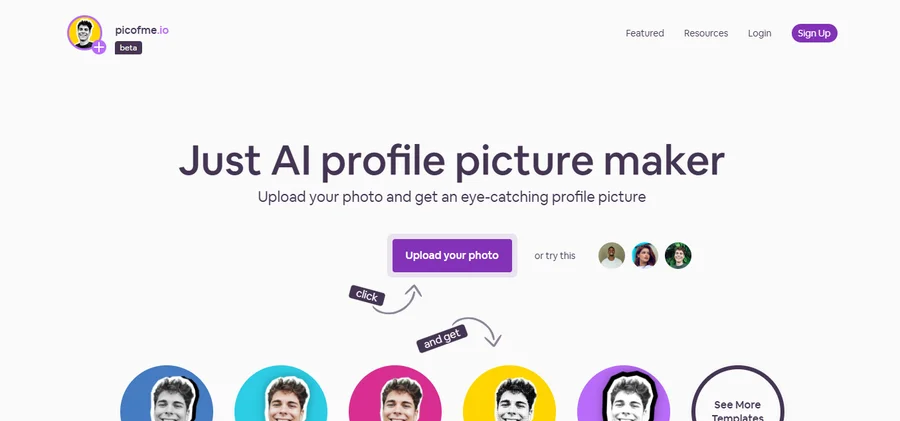
Picofme.io is a free AI profile picture maker built by Mixilab, a small Ukraine-based software studio. It removes the background from a portrait using AI, then lets you rebuild the image with layered templates covering backgrounds, borders, outlines, shadows, and filters. It works entirely in the browser, with no account and no paid tier.
The editing toolkit, in full
Most describe Picofme.io as "background removal plus a few templates." That undersells it. When I opened the editor myself, it revealed eight separate tools, more than any competing writeup mentions:
- Canvas: sets the frame shape for your output.
- Transform: repositions, zooms, and rotates the cutout.
- Background: solid colors, gradients, or a curated palette.
- Filter: 17 visual effects applied on top of the image.
- Outline: a toggleable line around your cutout, adjustable for color, thickness, and style.
- Shadow: adds depth behind the subject.
- Border: a separate frame element from the outline, also color- and thickness-adjustable.
- Layers: lets you stack a second image or text over the base photo.
That's a genuinely deeper toolkit than the "upload, pick a background, download" version most listings describe, and it's the reason Picofme.io keeps showing up next to full design tools in some directories, despite being built for one narrow job.
How it actually works
The official flow is four steps:
- Upload a photo. It's auto-deleted after processing.
- The AI removes the background.
- Pick from the generated variations and save, or open the full editor to adjust canvas, filters, outline, shadow, border, and layers.
- Download the result.
The AI needs to recognize an actual person in the frame. Upload something without a clear human subject and you'll get an empty cutout back, which is the most common complaint in the tool's own FAQ.
Build and share a template
Beyond editing a single photo, Picofme.io lets you construct a reusable template out of six stacked layers: background, picture, border, segmented outline, a second segmented profile picture slot, and a picture-or-text layer. Once built, that template can be saved and shared publicly, so a team, a Discord server, or a fandom can all generate consistent PFPs from the same base design.
That's a genuinely different use case from a one-off edit. A company running a rebrand, or a community organizing around an event, can hand out one template link instead of a style guide.
It's still actively maintained
One good sign for a free tool like this: Picofme.io keeps publishing small guides tied to what people are actually searching for, not just a static feature page from years ago. Recent examples include guides for making a Taylor Swift-themed PFP, a TikTok profile picture, and even a S.T.A.L.K.E.R 2 fan avatar. That's a small detail, but it means the tool hasn't been abandoned since launch, which matters when you're trusting a small site with your photo.
Formats and technical specs
Detail | Specification |
Supported formats | JPG, JPEG, JFIF, PNG, PJP, WEBP, GIF, BMP, TIF, TIFF |
Mobile app | None, web-only |
API | Not available |
Account required | No |
Photo storage | Auto-deleted after processing |
Developer | Mixilab (also builds Animotica and CropiPic) |
The format list is broader than most competitors mention. Beyond the usual JPG and PNG, it covers JFIF and PJP, both common when an image comes from a browser right-click save, and full TIFF support, unusual for a free tool this small.
Trust, privacy, and who's behind it
I ran the domain through both ScamAdviser and GridinSoft to check this myself rather than trust the marketing copy. ScamAdviser gives it a 100 trust score and labels it "Very Likely Safe," citing a valid SSL certificate and a domain registered in 2021. GridinSoft scores it 79 out of 100, "Trusted but Verify," with no malware or phishing detections over a 4.7-year history. The one flag worth knowing: the site owner's identity is hidden on WHOIS through a proxy registration, common for small sites but worth knowing before you upload anything personal.
On data handling, Mixilab states photos are deleted immediately after processing and no face data is stored or tracked. Mixilab itself is a small, Ukraine-based studio behind a handful of other tools, including a movie editor and a photo/video editor, which is useful context for a company that otherwise has no public-facing "About" page beyond its own site.
What it can't do
- No mobile app or API
- Single-person portraits only, no couples, pets, or group shots
- No 3D or animated avatars
- No batch processing, one image at a time
- No advanced retouching, color grading, or fine masking
What do real users say?
There's no aggregate star rating for Picofme.io anywhere. SoftwareFinder, SourceForge, Slashdot, and Techimply each list it with zero submitted reviews, so any "rating" you see quoted elsewhere isn't backed by an actual review count.
What exists instead is scattered comment feedback. On TechRaisal, one user praised how quickly the background removal handled several images across formats without manual cropping. Another noted it's solid for simple edits but that anyone wanting 3D or animated avatars needs a different tool, which matches the limitations above.
How it compares to the alternatives
Tool | Price | Best for | Where it wins over Picofme.io |
Picofme.io | Free | Fast single-person PFPs | No cost, no sign-up, template sharing |
Canva | Free tier, Pro $18/month | Broader design work | Brand kits, team tools, far more than portraits |
remove.bg | Free trial, paid credits from ~$3 | High-precision cutouts, automation | Sharper edge detection, has an API |
PFPMaker | Free | AI-enhanced portrait retouching | Adds portrait enhancement Picofme.io skips |
Free tier, Pro $10.99/month | General photo editing plus PFPs | Broader editing toolkit beyond profile pictures | |
Cutout.Pro | Credit-based, from $4.99/month | Background removal at scale, including video | Batch processing, API access, works on video too |
Picofme.io stays free because it never expands past its one job. Canva and remove.bg both start charging once you need scale or precision, and so does Cutout.Pro if you need batch processing or video background removal. PFPMaker is the closest direct match, also free, but leans on portrait enhancement rather than the layered template system that defines Picofme.io.
The verdict
Picofme.io is a small, purpose-built tool that does more under the hood than its plain interface suggests: an eight-part editing panel, a six-layer template system you can share publicly, and a guide library that tracks actual trends rather than sitting static. The trade-off is scope. It's free, but it's also narrow, and it stays that way on purpose.
If your task is one clean profile picture, it's worth the two minutes. If you need more than that, Canva or remove.bg will get you there for a price.
Frequently Asked Questions
What exactly does Picofme.io's editor let you control?▾
Can I build and share a custom PFP template?▾
Does Picofme.io have any user ratings?▾
Is Picofme.io free, and does it have hidden limits?▾
How does Picofme.io compare to Canva for profile pictures?▾
Is Picofme.io safe to upload a personal photo to?▾
Who makes Picofme.io?▾
Written by
Ethan Walker
Ethan Walker is a content strategist and SaaS industry veteran with over 10 years in the technology space and 5 years focused exclusively on AI. At FirmBees, he sets the editorial direction, selects which companies earn a full overview, and holds every piece to a standard built on verified data rather than vendor claims. His work is shaped by years of competitive analysis and hands-on product evaluation, written for readers making real purchasing decisions.
Comments
Leave a comment
Related posts
-600x338-yZUY6wfWDwNoXjx2sWuPuGw7Tg8qGl.webp%3F2026-08-24T19%253A59%253A47.360Z&w=3840&q=82)
Cutout Pro Review 2026: Pricing, Privacy Risks, and Whether It's Worth Your Data
Cutout Pro carries a verified 2024 breach, a 1.6-star Trustpilot record, and a naming collision that sends users to the wrong app. Here's what's safe to upload and what isn't.

Hotpot AI Review 2026: Tools, Pricing, and Ratings Explained
Hotpot AI offers 30-plus tools across AI image generation, headshots, photo editing, game assets, and writing under one login. This review covers what's verified, what competitors get wrong about pricing, and what the Trustpilot vs G2 rating gap actually means.

9 Best Sales Analytics Tools in 2026
Most "best sales analytics tools" lists ignore budget entirely. This one groups all nine tools, HubSpot, Zoho, Pipedrive, Salesforce, Gong, Clari, and more, by team size and price, with pricing verified directly against each vendor's live page.