Tensor Art Review 2026: I Tested the Free Plan and Checked Every Price
Author
Kavya Sharma
Date Published
Reading Time
12 min read

Every page ranking for "tensor art" right now describes a product that doesn't exist anymore.
I read every top-ranking review, then made a free account to see for myself. The reviews describe an older Tensor Art with one credit balance and a watermark on your images. The site I logged into on October 1, 2026 looks very different. It has more than forty one-click tools in a Quick Tools tab. It uses more than one type of credit. And a banner on the dashboard says one part of the site, called Forge, is moving to its own website with its own separate accounts.
So, the short answer. Tensor Art gives you 50 free credits a day, a single image on a fast model cost me 0.36 of one, and the published yearly plan is $69.90. The catch isn't the price. It's that the credits you buy don't spend everywhere.
So before you sign up, here's what you're actually getting.
What is Tensor Art?
Tensor Art is a browser-based AI image and video generator built on community-uploaded models, LoRAs (small add-on files that change a model's style) and ComfyUI workflows (a tool for building custom generation steps). You generate in the cloud with no GPU and no install, using 50 free daily credits or a paid plan. It also runs in-browser LoRA training, a creator marketplace, and a set of guided studios that skip manual parameter setup.
Free tier | Starter. 50 daily credits, image and video generation, LoRA training, 7-day storage |
What one image cost me | 0.36 credits on Z-Image-Turbo at 1152×768 |
Published yearly Pro | $69.90, listed at $118.80, marked 40% off |
Credit packs | 3,000 for $9.90 · 10,000 for $29.90 · 30,000 for $59.90 |
Pro adds | 300 daily credits, 25,000 bonus credits, priority queue, 1,000+ exclusive models, 200 fast generations monthly |
Library size | Vendor claims over 1 million models and LoRAs |
Operated by | ECHO INTERNATIONAL HK LIMITED (Hong Kong) |
Biggest catch | Credits, Energy and Tokens are separate balances, and Forge is splitting off with its own accounts |
Let's start with credits, since that's where most reviews get it wrong.
How many free credits does Tensor Art actually give you?
Fifty a day. Not 100, not 200.
The Starter tier on Tensor Art's own pricing page lists 50 Daily Credits, and my balance read exactly 50.00 when I opened the Create screen. Published reviews cite 50, 100 and 200, and three of those pages give no source at all. One of them is right by accident.

Now the number none of them have. I generated a golden retriever beside a vintage car at sunset on Z-Image-Turbo, landscape 1152×768. The receipt panel logged the cost at 0.36 credits and my balance dropped to 49.64.
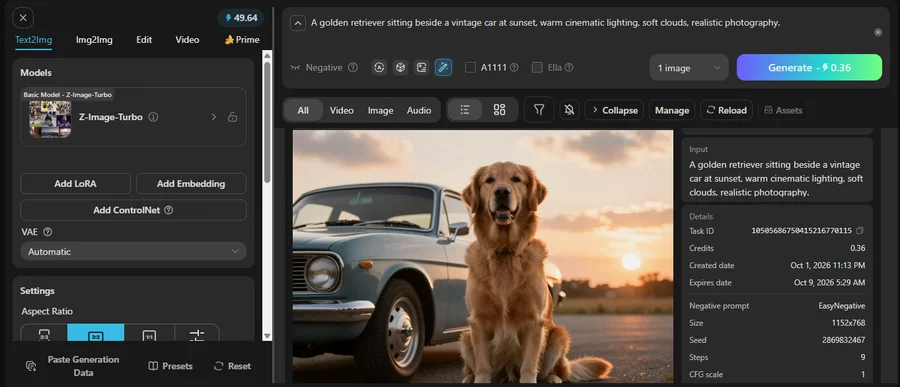
At that rate, 50 daily credits is roughly 138 images a day. Free.
Keep in mind that this is one model at one setting. Z-Image-Turbo is a fast model that runs in nine steps. Heavier models, bigger images and video will cost more credits. Tensor Art also raised video credit costs by about 25% during busy hours, according to its own peak hours post.
Still, 50 credits went further than I expected. One review, from ToolsForHumans, says the free tier is designed to frustrate you into upgrading. On a fast model, it didn't feel like that to me.
"Fine, so what am I paying for?"
How much does Tensor Art cost?
Verified on the pricing page on October 1, 2026:
Plan | Price | Daily credits | Bonus credits |
Starter | Free | 50 | None |
Pro, monthly | $9.90 | 300 | 1,000 |
Pro, quarterly | $21.90 (was $29.70, 26% off) | 300 | 5,000 |
Pro, yearly | $69.90 (was $118.80, 40% off) | 300 | 25,000 |
Yearly works out to about $5.83 a month and quarterly to $7.30, so the longer plans save real money. All Pro plans add a priority queue, 1,000+ exclusive models and tools, and 200 fast generations a month. Quarterly and yearly also list 4K output, up to 6 LoRAs and 30 days of free storage. Starter gives you 7 days.
You can also skip the subscription and buy credits once:
Credit pack | Price |
3,000 credits | $9.90 |
10,000 credits | $29.90 |
30,000 credits | $59.90 |
Older reviews list different prices because they copy from an outdated announcement post. The pricing page is the one to trust, so confirm at checkout.
At 0.36 credits per image, the 3,000-credit pack covers about 8,000 images. But that only works if every credit can be spent where you need it.
They can't.
Why don't my Tensor Art credits work everywhere?
Because the site now has separate balances for separate parts of it.
TA Credits run the main site. Energy runs Canvas, which Tensor Art says is completely separate from TA Credits. Tokens run TensorHub, a separate section for mature content that can't be paid for with daily free credits.
There's a newer change too. A banner on my dashboard says Forge is moving to its own website, forge.art, from September 24, and that Forge and TensorArt accounts will be separate. I opened it. Forge calls itself an infinite canvas run by an AI agent, and it asks you to log in to get free Energy. So Energy now lives on Forge, not on the main site.
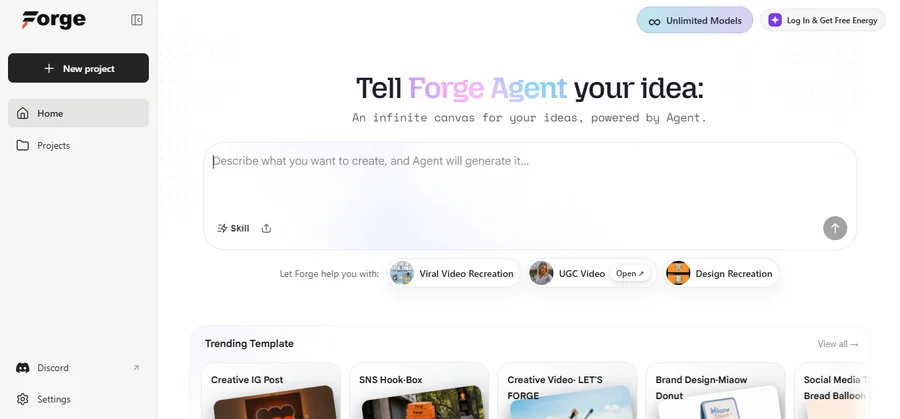
When Canvas launched, Tensor Art also said some premium models would move from the main site to Canvas over time. Seedance 2.0 moved on day one.
So before you buy credits, check where the model you want actually lives. Credits bought on the main site won't work on Canvas or TensorHub.
So what's locked, and what's just inconvenient?
What stays locked even after you pay
Three things stay locked even on Pro: downloading EXCLUSIVE models, commercial rights on every model, and some Quick Tools built around famous brand styles. Pro gives you access to 1,000+ exclusive models and tools, but that doesn't mean you can download them all.
The sharpest criticism on the SERP, reported by ToolsForHumans citing a thread in r/StableDiffusion, is that paying for Pro does not make EXCLUSIVE-badged models downloadable. The download control stays disabled regardless of tier.
Commercial rights work the same way, and this is the detail every competitor flattens. A paid plan generally covers commercial use, but individual community models carry their own licences. The plan isn't the permission slip. The model is.
The Quick Tools tab shows why this matters. It has more than forty one-click tools, like removing a background, making an image bigger, designing a logo, or trying clothes on a model. They're useful. But some are built around famous styles and brand names, such as a Marvel-style wallpaper, Ghibli style and Barbie style. That's fine for personal use. If you're making something for a client, check first that you're allowed to use it.
Do Tensor Art images expire?
Yes. Seven days on the free tier.
The Starter plan lists free storage up to 7 days, and my generation's detail panel put it beyond doubt: created October 1 at 11:13 PM, expires October 9 at 5:29 AM. An explicit date, printed next to the image.
That kills the 14-day and 60-day figures older reviews still publish, and it matches the one hands-on third-party account that reported roughly a week. The Library page separately offers a storage upgrade, so paid storage likely works on capacity rather than a timer, but I didn't buy it and I'm not going to guess.
Download anything you want to keep on the day you make it.
So how good are the images?
Where Tensor Art is genuinely strong
Tensor Art is strongest in three areas: image quality on the free tier, the size of its model library, and ready-made studios that need no setup.
The free images look good. My golden retriever image came back sharp. The car's chrome and the dog's fur look clean, and the sun and clouds look right. One review, from AutoGPT, reported blurry results that stayed blurry on a second try, so results may vary. Mine is one image on one model.
The model library is huge. Tensor Art's pricing page says you get access to over 1 million models and LoRAs. You can browse by style, such as Manga, Photography, Chibi and Vintage Art.
The studios save you setup time. The homepage has ready-made tools, so you don't have to change any settings:
- OC Creator for original characters
- Anime Lab for anime characters and scenes
- Photoreal Studio for realistic photos
- Smart Edit for changing existing images
- Design Agent, where you chat to generate and edit
- Brand Design for logos and brand visuals
If you want more control, the Create screen has tabs for text to image, image to image, editing and video. You can also add LoRAs for style changes and ControlNet for guiding poses and composition. LoRA training runs in your browser, so you don't need your own GPU.
So where does it fall down?
Where Tensor Art falls down
Tensor Art's weak spots are its mobile apps, slow servers at busy times, and the trouble some users have cancelling or deleting an account.
The mobile apps are the biggest problem. The Android app has about 4.1 stars from 8,871 reviews. Reviews from July to September 2026 keep making the same complaints:
- The workspace freezes when a LoRA doesn't fit, and you can't clear the stuck task.
- Image to image barely works.
- Some words in the app show up in Chinese.
- Daily missions give you very few credits.
- Some images cost more credits than the price shown. On desktop, my image cost exactly the 0.36 credits shown on the button.
The iOS app scores higher, at about 4.6 from 922 ratings. But the reviews I found are from late 2023 and early 2024, so they're old. Some users say the app loads slowly, and others couldn't find a way to delete their account.
Cancelling can be confusing. One Android reviewer paid, couldn't work out how to use the app, and found the cancel instructions in a language they couldn't read. They ended up cancelling through Google instead.
The servers get slow when the site is busy. Tensor Art's own peak hours post says it raised video credit costs by about 25% during a busy two-week period. It then gave members 500 credits, and Pro members 14 extra days. A company wouldn't pay you back for slow servers unless the problem was real.
Some readers have a more specific problem: moving over from Civitai.
Coming from Civitai?
You can't import models from Civitai directly anymore. Tensor Art stopped this on March 12, 2026, after Civitai shut down the feature it relied on.
The workaround is manual. Download the model file from Civitai, then upload it to Tensor Art yourself. That's fine for three models and slow for thirty.
Which should you use? Civitai is better if you want to keep model files and run them on your own computer. Tensor Art is better if you want to make images in your browser without a GPU. On Trustpilot, the one positive review says Tensor Art is quicker to learn, has shorter waits and costs less than Civitai.
Only two reviews exist on Trustpilot, so don't treat that as proof.
Who should use Tensor Art, and who should skip it
Use it if you make anime, character or OC work, you have no GPU, and you learn by pulling apart results you like. Use it if you want to train a LoRA without renting compute. Use it if 138 free fast images a day covers your actual volume, which for most hobbyists it comfortably does.
Skip it if you need downloadable model files you own. Skip it if you need one predictable balance rather than three. Skip it if you'll be working mainly from a phone. And skip it if one specific premium model is your whole reason for joining, until you've checked which surface that model currently lives on.
Is Tensor Art worth paying for?
Run these five checks on a free account first. All of them take about ten minutes.
- Generate one image and read the receipt. The detail panel prints the exact credit cost. Divide 50 by that number and you know your real daily ceiling.
- Check the expiry date printed next to that generation. Seven days on free. Plan your downloads around it.
- Check the badge on the models you actually want. EXCLUSIVE and EARLY ACCESS behave differently, and Pro doesn't flatten the difference.
- Check which surface those models live on. Main site, Canvas, TensorHub or Forge. Credits don't travel, and Forge accounts are separating.
- Check the model's licence, not just your plan, if the output is going anywhere commercial.
If all five checks look fine, the free tier already covers most beginners, so there's no rush to pay. Upgrade when you hit the 50-credit limit or need something Pro adds, like 300 daily credits or 30 days of storage on the quarterly and yearly plans. Skip the checks and you could buy credits for a model that sits behind a different balance.
The bottom line
The strongest thing I can tell you about Tensor Art is also the most useful: verify it yourself, because almost nobody else has.
Two Trustpilot reviews. No G2 ratings. App store scores that split hard by platform. A page-one search result where the most accurate description of the product was written by a competitor trying to sell you a different one. Meanwhile the actual product gave me 50 free credits, charged 0.36 for a sharp image, and printed its own expiry date on the receipt.
None of that required a credit card. Sign up free, run the five checks above, and decide from your own account rather than anyone's feature table. If you're weighing it against the rest of the category, our AI image generator reviews cover the alternatives worth a side-by-side look.
Frequently Asked Questions
How many free credits does Tensor Art give you per day?▾
How much does Tensor Art cost?▾
Do Tensor Art images expire?▾
Is Tensor Art free to use commercially?▾
What is Tensor Art's support email?▾
Can I still import my models from Civitai?▾
Tensor Art vs Civitai: which should I use?▾
Written by
Kavya Sharma
Kavya Sharma is a senior content writer and prompt specialist at FirmBees, focused on AI tools, workflow automation, and practical prompt engineering. She holds Commerce degrees from Delhi University and IGNOU, along with a data analytics certification covering Excel, Power BI, and SQL. That analytical training is visible in her work: every prompt she publishes is tested across multiple AI models, and her guides include specific inputs, expected outputs, and measurable comparisons.
Comments
Leave a comment
Related posts

Viyou AI Review 2026: Features, Pricing, and Is It Worth It
Viyou AI promises unlimited AI video and image generation, but the pricing is split across three separate systems the ads never mention. Here's what it actually costs, what the free tier really gets you, and what to check before you subscribe.

Picofme.io: The Complete Guide to Features, Templates, and Alternatives
Picofme.io strips photo backgrounds and builds profile pictures with an 8-tool editor and shareable templates. Here's every feature it has, what it can't do, and how it compares to Canva, remove.bg, PFPMaker, and Cutout.Pro.

Hotpot AI Review 2026: Tools, Pricing, and Ratings Explained
Hotpot AI offers 30-plus tools across AI image generation, headshots, photo editing, game assets, and writing under one login. This review covers what's verified, what competitors get wrong about pricing, and what the Trustpilot vs G2 rating gap actually means.